All Customer Messages in One Place

SHARED INBOX
Stop jumping between email and SMS to answer customers. UserDeck brings every conversation into one organized inbox where your whole team can work together.
No credit card required.
What UserDeck Customers Achieve:
30-50%
reduction in support costs
60%
faster customer response times
40%
increase in support ticket volume handled without adding staff
See UserDeck in Action
See how UserDeck turns customer support into a strategic advantage. Our video shows how to centralize communications, speed up issue resolution, and strengthen customer relationships.

Shared Inbox Key Features

See how UserDeck’s Shared Inbox solves the most common customer support challenges.

Unified Communication Hub

Connect all customer touchpoints in one organized workspace.

Team Collaboration Center

Work together with notes, assignments, and tagging.

Customer Context Panel

See complete customer information and history alongside every conversation.

Priority Management System

Focus your team on urgent issues with smart prioritization.

What Makes UserDeck’s Shared Inbox Different
Complete Customer Context

See interaction history and customer data in one view without switching systems.

Built by Support Experts

Created by people who've handled 500,000+ tickets and know what actually works.

Multi-Channel Without Complexity

Connect email and SMS in minutes, not hours of complicated setup.
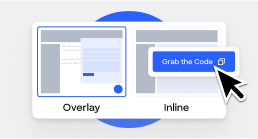
Features That Transform Support

UserDeck integrates seamlessly with the platforms you rely on daily:

Unified Communication Hub

Connect all customer touchpoints in one organized workspace.

Team Collaboration Center

Work together with notes, assignments, and tagging.

Customer Context Panel

See complete customer information and history alongside every conversation.

Priority Management System

Focus your team on urgent issues with smart prioritization.

Organization & Prioritization
Complete Customer Context

See interaction history and customer data in one view without switching systems.

Built by Support Experts

Created by people who've handled 500,000+ tickets and know what actually works.

Multi-Channel Without Complexity

Connect email and SMS in minutes, not hours of complicated setup.
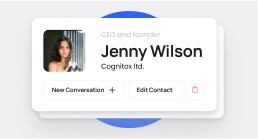
Multi-Channel Without Complexity

Connect email and SMS in minutes, not hours of complicated setup.
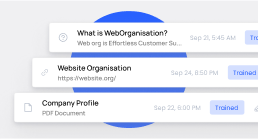
Team Collaboration Tools

Team Inbox
Share the support load with a workspace where everyone can help.
Internal Notes
Add private team comments that customers never see.
Ticket Assignment
Assign conversations to specific people so nothing gets forgotten.
Saved Replies
Use templates for common questions while keeping your brand voice.

Beyond Customer Support:

Other Ways to Use UserDeck’s Shared Inbox

Sales Lead Management

Track leads and ensure timely follow-up with priority tracking.

Client Service

Keep all client communications and requirements in one place.
Internal Help Desk

Organize IT, HR, or facilities requests with proper routing.

Community Management

Manage user discussions, feature requests, and feedback centrally.

Success Story: How a Design Agency Transformed Their Support

Before:

Before implementing UserDeck's Shared Inbox, the agency struggled with:

The Solution:

UserDeck centralized all communications with clear workflows and smart assignments.

Customers providing great support
“UserDeck provides us with a turnkey solution for our knowledge base which not only helped us setup faster than an inhouse solution, but provided a much better feature set.”
Jonathan Y • Nodecraft

Why Businesses Choose UserDeck

Provide better support and understand problems
Grows With You
From solopreneurs to startups, UserDeck scales seamlessly as your business grows.
Launch Today
Get running in hours. No consultants or training needed.
Real Human Help
Our support team responds quickly. We practice what we preach.
Simple Pricing
No per-agent fees. No surprises. Budget confidently.

More Features You’ll Love

Rich Text Editor

Create professional responses with our intuitive editor and HTML support.

Message Tracking

Know when customers read your replies to time follow-ups perfectly.

Multiple Email Support

Connect sales@, support@, and info@ while keeping departmental identity.

Website Widget Integration

Collect website inquiries that automatically become tickets.

Connects to Your Essential Tools

Build a seamless support ecosystem with UserDeck integrations.

Communication Channels

Bring Facebook and SMS conversations into your unified inbox.

Website Integration

Embed knowledge base and support widget with WordPress, Drupal, or simple embed code.

Developer Tools

Use our API and webhooks for custom workflows and automation.

Faster Solutions

Complete context means problems solved in fewer interactions and happier customers.

Reduced Support Costs

Templates, knowledge base, and workflows help each agent handle more tickets.

Keep Customers Longer

Consistent, personal support creates experiences that build loyalty.

Identify Product Improvement Opportunities

Spot patterns in tickets that reveal what to fix or build next.

Getting Started is Simple

Step 1
Connect Your Channels
Connecting your email, Facebook, SMS in minutes.
Step 2
Set It Up Your Way
Match your brand, add saved replies and team members
Step 3
Launch
Place the support widget on your website and publish helpful articles.
Step 4
Watch It Work
Track performance and happy customers
FAQ’S

Frequently Asked Questions

Ask any questions.
How long does implementation typically take?

Most teams are up and running within 24-48 hours. Our guided setup process helps you configure your shared inbox, connect your communication channels, and set up your articles quickly.

Can we maintain separate email addresses while using a shared inbox?

Absolutely. UserDeck allows you to connect multiple email addresses (support@, sales@, billing@) while maintaining their distinct identities in customer communications. Responses will appear to come from the appropriate address.

How does UserDeck handle high ticket volumes?

UserDeck is designed to scale with your business. The prioritization system, saved replies, and team assignment features help your team handle increasing volumes while maintaining quality. Many customers report handling 2-3x more tickets with the same staff.

Is training required for our team?

The intuitive interface requires minimal training. Most team members become proficient within hours of using the system. We also provide a comprehensive knowledge base to ensure your team gets the most from UserDeck.

How secure is our customer data?

UserDeck implements industry-standard security practices including data encryption, role-based access controls, and regular security audits. We’re committed to maintaining the highest standards of data protection for your sensitive customer information.

Does UserDeck offer a free trial?

Yes! UserDeck offers a 14-day free trial with full access to all features. No credit card is required to get started, and you can cancel at any time.

How is UserDeck priced?

Unlike many competitors who charge per agent (increasing your costs as your team grows), UserDeck offers plans with a specific number of agents. Our transparent pricing model means no hidden fees or surprise increases. Visit our pricing page for detailed information on our plans.